1、什么是promise
在JavaScript中,我们经常会用到回调函数,而回调函数的使用让我们没法使用return,throw等关键字。JS引用promise正好解决了这个问题。
promise单词意思是承诺,代表未来的某个事情或者是行为。promise是一个容器,包含了异步操作。因此我们认为promise是异步操作的解决方案。所有异步操作都可以通过promise来解决
2、了解promise
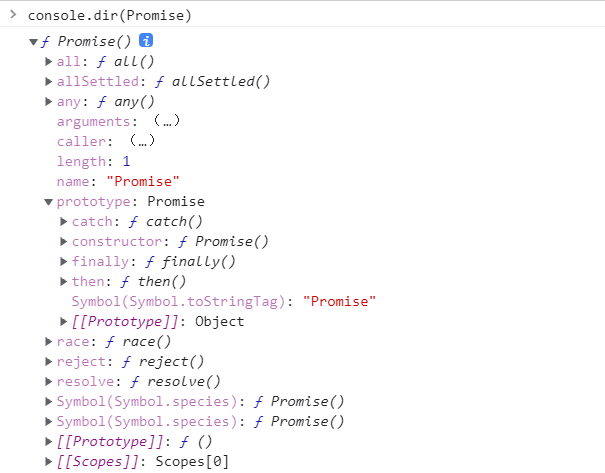
上面说到promise是一个容器,那我们先在控制台打印一下。
![image]()
可以看到,Promise是一个构造函数,自身就有all、reject(代表失败的回调函数, 失败的操作)、resolve(代表成功的回调函数, 成功的操作)这几个于我们而言比较眼熟的方法,原型上有then、catch等同样很眼熟的方法。这么说用Promise new出来的对象肯定就有then、catch方法。
2.1、promise对象的特点
- Promise对象的状态不受外界影响。包含pending(进行中)、fulfilled(已成功)和rejected(已失败)三种状态。只有异步操作结果才可决定是哪种状态,其他任何操作都无法改变这种状态。
- 一旦状态改变,就不会再变。Promise对象的状态改变,只有两种情况:从pending变为fulfilled和从pending变为rejected。只要这两种情况发生,状态就不会再变了,这时就称为 resolved(已定型)
举个例子:
1
2
3
4
5
6
7
8
9
10
11
12
13
14
15
16
17
18
19
20
21
22
23
24
25
26
27
28
29
30
| let action = new Promise(function (resolve, reject) {
setTimeout(function () {
let data = Math.floor(Math.random() * 100);
console.log(data);
if (data > 50) {
resolve({
msg: '成功',
data,
});
} else {
reject({
msg: '失败',
data,
});
}
}, 30)
});
console.log(action);
action.then(function (d) {
console.log(action);
console.log(d);
}, function (d) {
console.log(action);
console.log(d);
});
|
输出结果:
Promise { }
52
Promise { { msg: ‘成功’, data: 52 } }
{ msg: ‘成功’, data: 52 }
Promise也有一些不足的地方。其一,一旦新建Promise就会立即执行,无法取消。如果不设置回调函数,Promise内部抛出的错误不会反应到外部。其二,当处于pending状态时,无法得知目前是哪个阶段。
2.2、了解宏任务和微任务
先看个例子:
1
2
3
4
5
6
7
8
9
| console.log("a");
setTimeout(() => console.log("b"))
let p = new Promise((resolve, reject) => {
resolve()
console.log("c");
}).then(() => {
console.log("d");
})
console.log("e");
|
输出结果:
a
c
e
d
b
总结:
宏任务指的是click,setTimeOut等DOM事件 微任务指的是promise的异步操作,数据查询
宏任务要比微任务先进栈,但是后出栈(微任务比宏任务先执行)。因此上述代码中setTimeout函数最后执行。
了解更多有关宏任务和微任务的内容
3、使用promise
3.1 异步加载图片
1
2
3
4
5
6
7
8
9
10
11
12
13
14
15
16
17
18
19
| function loadImageAsync(url){
return new Promise(function(resolve,reject){
var image = new Image();
image.onload = function(){
resolve(this)
};
image.onerror = function(){
reject(new Error('Counld not load image at'+url))
}
image.src = url
document.body.appendChild(image)
})
}
let urlimg = 'https://static.likepoems.com/cdn/images/logo.jpg'
loadImageAsync(urlimg).then(function(image){
console.log(`Image loaded:${image.src}`);
},function(error){
console.log(error);
})
|
3.2 使用Promise封装ajax
1
2
3
4
5
6
7
8
9
10
11
12
13
14
15
16
17
18
19
20
21
22
23
24
25
26
27
28
29
| function getData(url) {
let promise = new Promise(function (resolve, reject) {
let ajax = new XMLHttpRequest();
ajax.open('get', url);
ajax.send();
ajax.onreadystatechange = function () {
if (ajax.readyState === 4) {
if (ajax.status === 200) {
resolve(ajax.responseText);
} else {
reject(ajax);
}
}
}
});
return promise;
}
getData('./1.txt').then(function (d) {
console.log(d);
console.log('成功');
}, function (err) {
console.log(err);
console.log('失败');
});
|
运行结果:
![image]()
3.3 then方法与链式操作
举个例子:
2.txt
1
2
3
4
5
| {
"name":"李明",
"sex":"男",
"url":"./2.txt"
}
|
1
2
3
4
5
6
7
8
9
10
| getData('./2.txt').then(function (d) {
console.log('步骤1', JSON.parse(d).url);
return getData(JSON.parse(d).url);
}).then(function (d) {
console.log('步骤2', JSON.parse(d).url);
return getData(JSON.parse(d).url);
}).then(function (d) {
console.log('步骤3', JSON.parse(d).url);
return getData(JSON.parse(d).url);
})
|
输出结果:
步骤1 ./2.txt
步骤2 ./2.txt
步骤3 ./2.txt
Promise实例的then( )可以一直调用下去。
3.4 出现错误的处理
1
2
3
4
5
6
7
8
9
10
11
| getData('./2.txt').then(function (d) {
console.log('步骤1', JSON.parse(d).url);
}).then(function (d) {
console.log('步骤2', JSON.parse(d).url);
resolve();
}).then(function (d) {
throw new Error("Error");
console.log("then");
}).catch(function (err) {
console.log("catch error:" + err.message);
});
|
输出结果:
步骤1 ./2.txt
catch error:Unexpected token u in JSON at position 0
总结:
若遇到异常抛出,会顺着promise链寻找下一个onRejected失败回调函数或者由catch指定的回调函数。我们一般使用catch来终止promise链,避免链条中的rejection抛出错误到全局
3.5 Promise.all()使用方法
举个例子:
1
2
3
4
5
6
7
8
9
10
11
12
13
14
15
16
17
18
19
20
21
| let p1 = new Promise((res, rej) => {
setTimeout(() => {
res("p1")
}, 1000)
})
let p2 = new Promise((res, rej) => {
setTimeout(() => {
res("p2")
}, 2000)
})
let p3 = new Promise((res, rej) => {
setTimeout(() => {
res("p3")
}, 3000)
})
Promise.all([p1, p2, p3]).then((r) => {
console.log(r);
}).catch((err) => {
console.log(err.message);
})
|
输出结果:
[ ‘p1’, ‘p2’, ‘p3’ ]
总结: Promise.all( )实参是所有Promise实例的字面量组成的数组,执行完毕的结果是所有输出结果的所组成的数组。
4、拓展:async/await
4.1 async的使用
async函数使得异步操作变得更加方便
1
2
3
4
5
6
7
8
|
async function hello() {
return "helloworld"
}
console.log(hello());
hello().then((r)=>{
console.log(r);
})
|
输出结果:
Promise { ‘helloworld’ }
helloworld
4.2 await的使用
await可以让代码暂停下来等待异步任务完成,await关键字只能放在async标识的异步函数里面才能够生效。
举个例子:
1
2
3
4
5
6
7
8
9
10
11
12
13
| function getNumber() {
return new Promise((res, rej) => {
setTimeout(() => {
res(12)
}, 2000)
})
}
async function test() {
let r = await getNumber().then(v => v)
r++
return r
}
test().then(v => console.log(v))
|
输出结果:
13
1
2
3
4
5
6
7
8
9
| function getNumber() {
return new Promise((res, rej) => {
setTimeout(() => {
res(12)
}, 2000)
})
}
let r = await getNumber().then(v => v)
console.log(r);
|
输出结果:
SyntaxError: await is only valid in async function(语法错误)